The more I teach others about persuasion, the more clearly I see the principles of influence as a survival tool. Not only did they help our ancestors live day to day, they help us deal with the complexities of life in this information-overloaded society in which we live. Let’s consider the principles in relation to our ancestors.Liking – One way to engage liking is through similarity. In ancient times someone who looked like you was probably friendly whereas someone who looked different might be an enemy. It became easier to trust those with whom you could quickly tell you had something in common.Reciprocity – If someone helped you it would be wise to help him or her when the opportunity presented itself because you never knew when you might need his or her help again.Consensus – There’s safety in numbers so it was probably a good survival bet to go along with the crowd instead of opposing it. If everyone was in favor of some action your optimal choice was to go along with the group or you’d find yourself ostracized.Authority – We place a lot of confidence in those with superior wisdom and knowledge. It paid to go along with the leader’s direction because opposition could end your life in a multitude of ways.Consistency – To do what you promised would gain you favor most of the time. In turn you learned to rely on those with a track record of coming through as expected whether it was on the farm or on the battlefield.Scarcity – When good opportunities, like food and drink, came along it was a wise choice to take advantage of the opportunity because you never knew if such an opportunity would come around again.In the modern world we may not have life and death decisions very often but the principles help us keep our sanity. In my presentations I like to share a quote from William C. Taylor’s article Permission Marketing, which was written for the magazine Fast Company.“This year, the average consumer will see or hear one million marketing messages – that’s almost 3,000 per day.”Can anyone possibly take in 3,000 marketing messages every day, sort through them all, weigh the pros and cons and make the best rational decision? Of source not! You’d need a super computer to do that. But here’s a scary thought – Taylor’s quote is more than 15 years old! A more recent article on the New York Times, Anywhere the Eye Can See, It’s Likely to See an Ad, puts the number of daily marketing messages we’re exposed to closer to 5,000!
 To help us deal with the complexities of modern life we use the principles of influence as mental shortcuts. They help us wade through all the noise and when we hear something that resonates with us quite often that’s all we need to make a quick, satisfactory decision. Liking – A friend tells you the company they used to put in their new kitchen floor and after a few questions you like what you hear so you decide to call the company for a quote. That saves a lot of time because you don’t have to do a lot of research. Reciprocity – You do something that’s helpful, something another person truly appreciates. You sense they appreciate you and believe you want the best for them. It’s only natural for him or her to say, “Yes” if you need their help in return. Now you’re building relationship. Consensus – If everyone is doing it then it must be worth considering. After all, quite often the wisdom of the crowd is better than a few smart people. Therefore best-selling items can usually be relied on over new products or services. Authority – With the crush of modern life it’s easier to turn to accountants for our taxes, lawyers for legal questions and doctors for our health. We find it easier to pay these people for their expertise because it gives us time to focus on things we’re good at and things that are more important to us. Consistency – As society becomes more inter-dependent we rely on each other. A big part of the reliability is banking on someone doing what they said they would. We may be more pleased with a “steady Eddie” worker over the person who sometimes does great work and other times does poor work or misses deadlines.Scarcity – “Sale ends Sunday” is a classic. We don’t want to lose out on the possibility of a great deal so we get off the couch and get to the store before the end of the weekend. Much of the time this is an open door for us to get better deals.So there you have a comparison of the principles of influence in ancient versus modern-day survival. They don’t explain all of human behavior but if you pay attention you’ll see they do explain an awful lot of why people do what they do. Look for ways to ethically and correctly tap into them and you’re sure to be a more effective persuader.
 Brian Ahearn, CMCT® Chief Influence Officer influencePEOPLE Helping You Learn to Hear “Yes”.Cialdini “Influence” Series! Would you like to learn more about influence from the experts? Check out the Cialdini “Influence” Series featuring Cialdini Method Certified Trainers from around the world.
Can You Beat the Odds?

Courtesy of StockVault
Do you think you have an addictive personality? No what about when it comes to games of chance are you fooled by the odds in your head?
New research published in Proceedings of the National Academy of Sciences, PNAS reports that an area of the brain thought to be important for emotion may be hyperactive in gambling addicts. People who suffer damage to this area – the insula – do not appear to experience the distorted thinking that spurs people to keep gambling.
Dr. Luke Clark, of the University of Cambridge, and colleagues set out to explore whether there might be a neurological explanation for the erroneous beliefs seen in problem gambling. Medical News Today reports that to do this Dr. Clark and colleagues needed to examine patients with brain injury, as he explains:
“While neuroimaging studies can tell us a great deal about the brain’s response to complex events, it’s only by studying patients with brain injury that we can see if a brain region is actually needed to perform a given task.“
The researchers recruited patients with injuries to one of three different parts of the brain – the insula, the amygdala or the ventromedial prefrontal cortex – and invited them to play two different gambling games: one using a slot machine and another using a roulette wheel.
The slot machine game was designed to deliver wins and near misses, such as a near jackpot where one of the cherries is just one place above or below the winning line. The roulette game just involved red or black predictions to bring out the gambler’s fallacy (i.e. assuming the chances of black are higher if there has been a run of reds).
For comparison, the researchers also invited patients with injuries to other parts of the brain and healthy volunteers to play the gambling games as well.
Many of us who play the lottery or the occasional game on a slot machine or roulette wheel have felt the hope that is reflected in thoughts like – “I didn’t win this time, so I am bound to win next time.“ Problem gamblers seem to be more susceptible to this distorted thinking – what the researchers describe as “distorted psychological processing of random sequences (the gambler’s fallacy) and unrewarded outcomes that fall close to a jackpot (near misses).”
Many of experience the gambler’s fallacy when we toss a coin and get 10 heads in a row. There is a natural tendency to believe the odds of tossing a tails next time is higher. Yet while it feels hard to believe, the odds are exactly the same for the 11th toss, even after 10 heads in a row, as they were for the first – the chance of tossing tails is still 50-50.
The “near misses” distorted thinking is the kind that makes us believe that because we just missed the jackpot this time, it means we are more likely to hit it next time or in the future.
The results showed that only participants with intact insulas showed signs of cognitive distortion. They were more motivated to continue playing after near misses (compared with after full misses) on the slot machine, and they were also more likely to choose either color less after longer runs of that color on the roulette game.
This was not the case in those participants who had suffered damage to the insula, suggesting the damage had abolished the tendency to the type of distorted thinking that problem gamblers are more prone to.
Dr. Clark says the finding leads them to believe “the insula could be hyperactive in problem gamblers, making them more susceptible to these errors of thinking.“
Top 10 Types of Phishing Emails
Criminals have countless methods to trick email users.  By: David EllisPhishing is the electronic version of social engineering and has found a huge market in our email-obsessed world. Hackers send fraudulent emails out to tens of thousands of people, hoping a few will click on attached links, documents, or pictures. The goal? Get recipients to willingly provide valuable social security numbers, passwords, banking numbers, PINs, and credit card numbers.
 This is achieved through a few different methods. Sometimes, cybercriminals trick email recipients into opening an email attachment that loads harmful malware onto their system. Other times, they trick recipients into providing sensitive personal information directly via web forms. Either way, these seemingly teeny mistakes could make serious ripples across your organization, compromising either corporate or personal security.SEE ALSO: 7 Ways to Recognize a Phishing Email.Typically, phishers send legitimate-looking emails that appear as though they originated from reputable companies that many people do business with like BestBuy, Amazon, Federal Express, DHL, and PayPal. The emails often ask customers to confirm information or to go to the business site by clicking on a provided link, and often include a statement of impending consequences if you fail to act.Here are a few common ploys cybercriminals use to trick you.1. The Government ManeuverThis type of email looks like it originated from a federal body, such as the FBI, and tries to scare you into providing your information. Common messages include, ‘Your insurance has been denied because of incomplete information. Click here to provide your information.’ Or, ‘Because you illegally downloaded files, your Internet access will be revoked until you enter the requested information in the form below.’
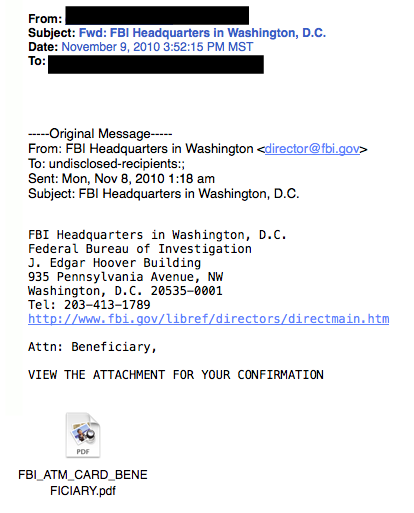 2. The Friend TacticIf an unknown individual claims to know you in an email, you are probably not suffering from amnesia. More than likely, it is an attempt to get you to wire him/her money. A variation on this theme is that one of your known friends is in a foreign country and needs your help. Before you send your ‘friend’ money, give them a call to verify. Your true friend’s email contact list was probably hijacked.
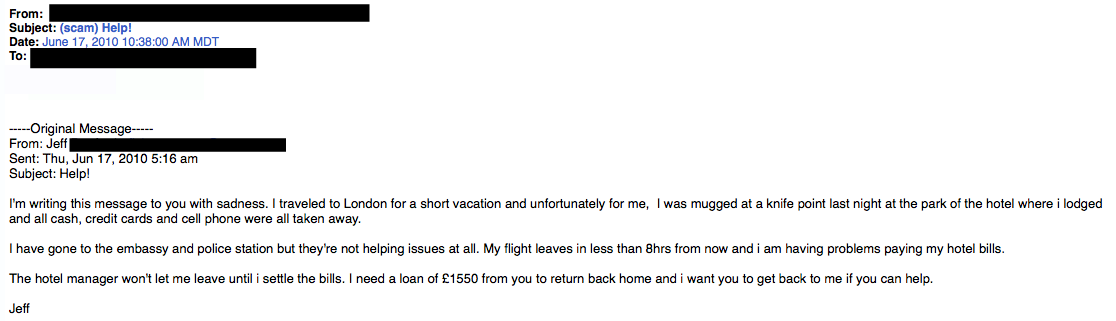 3. The Billing ProblemThis phishing tactic is tricky because it appears quite legitimate. This email states that an item you purchased online cannot be shipped to you because the credit card was expired (or billing address wasn’t correct, etc.). If you click on the provided link, it takes you to a spoofed website and asks for updated payment/shipping information, etc.
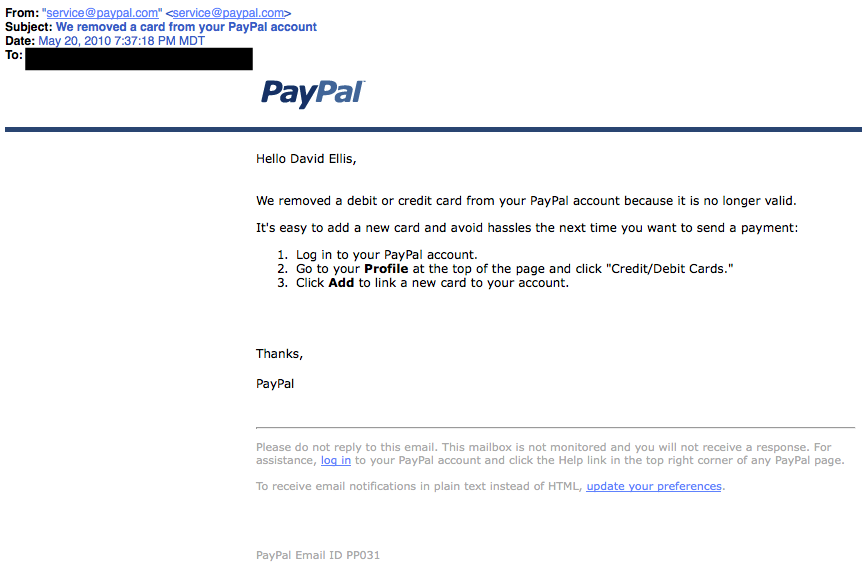 A lot of folks have personal and business PayPal accounts. Here, notice that the email header is from [email protected]. While that may sound legit, everything from PayPal will have an address of …@paypal.com4. The Expiration DateThis type of email falsely explains that your account with [company name] is about to expire, and you must sign in as soon as possible to avoid losing all your data. Conveniently enough, there is a link in the email, which again takes you to a spoofed login page.
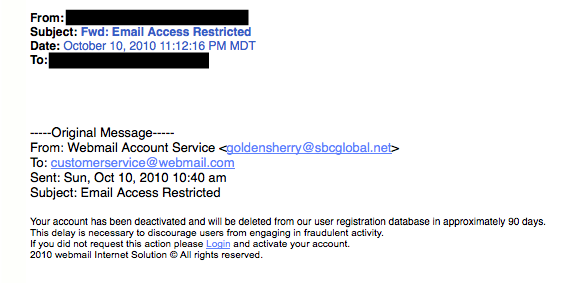 5. The Virus ScareThis type of email states that your computer has been infected! In order to avoid losing your data and infecting your computer the email instructs you to follow the provided link, or download the “anti-virus” attachment.
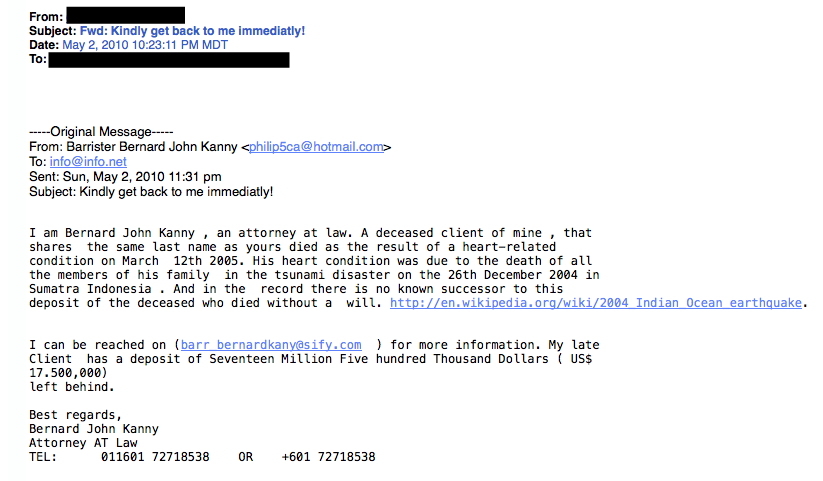
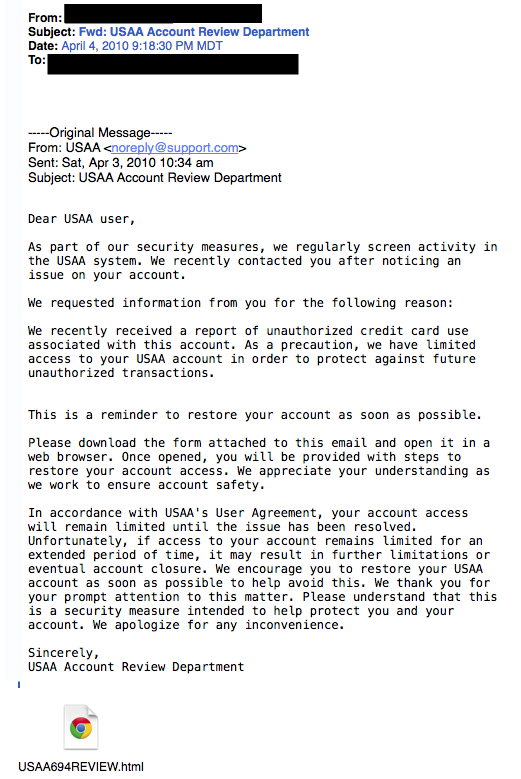 Whatever you do, DON’T CLICK ON THE LINK!6. The Contest WinnerDon’t get too excited when you receive emails that claim you’ve won something, or received an inheritance from a relative you’ve never heard of. 99.9% of the time, these are absolutely bogus. To claim your prize, the email requires you click a link and enter your info for prize shipment.
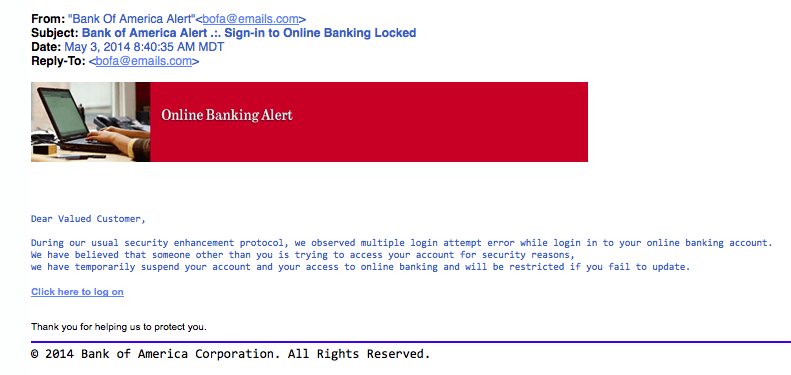
 7. The Friendly BankYour bank may offer account notifications when certain amounts are withdrawn from your accounts. This ploy tricks you with a fake account notification stating that an amount has been withdrawn from your account that exceeds your notification limit. If you have any questions about this withdrawal (which you probably would), it gives you a convenient link that leads to a web form asking for your bank account number “for verification purposes.” Instead of clicking on the link, give your bank a call. They may want to take action on the malicious email.
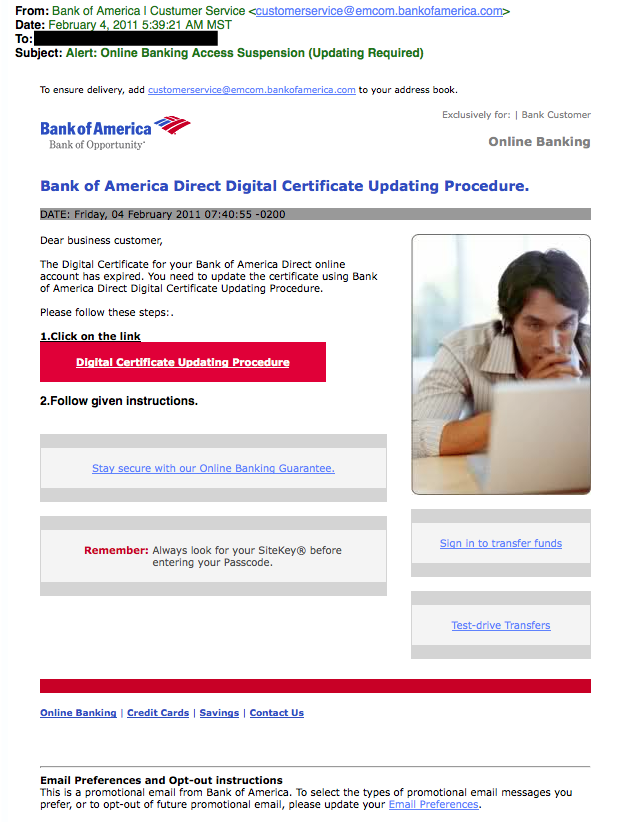 Due to the graphics and opt-out instructions, this phishing attempt seems very legitimate.8. The VictimBeing wrongly accused of something doesn’t feel good. This type of phishing email acts as an angry customer whom supposedly sent you money in return for a shipped product. The email concludes with the threat that they will inform the authorities if they don’t hear from you.
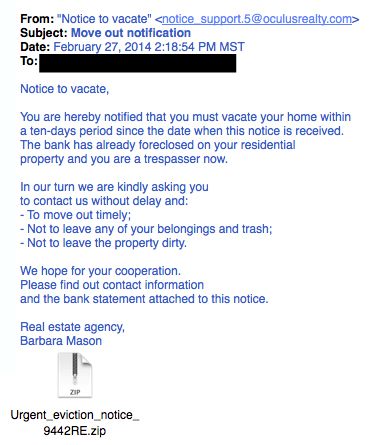 This is another type of victim scam. Who wouldn’t be a little worried after receiving this email?9. The Tax CommunicationPractically everyone has annual taxes to submit. That’s why this phishing attempt is so popular. The message states that you are either eligible to receive a tax refund, or you have been selected to be audited. It then requests that you submit a tax refund request or tax form.
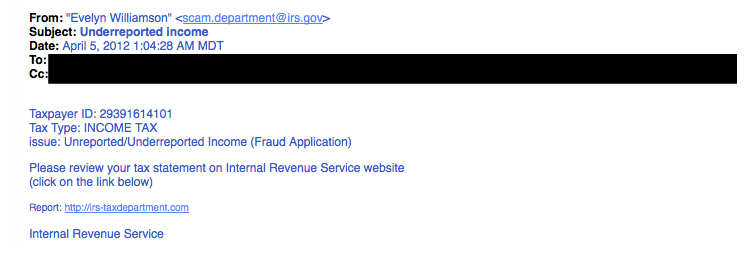 10. The CheckupThis is one of the more unassuming phishing email attempts. It claims [company name] is conducting a routine security procedure and requests you verify your account by providing information. This scam is especially effective if you happen to be a customer of the named business.
 If you receive a phishing email:Don’t click on any links, open attachments, or expand any included picturesDon’t try to reply to the senderReport the scam (forward the e-mail to the FTC – [email protected])Delete the email from your computerIf you do legitimate business with a company mentioned in the phishing email, you can call the business and ask if they would like you to forward the email to them, so they may take further action.Was this post helpful? Share it!David Ellis (GCIH, QSA, PFI, CISSP) is Director of Forensic Investigations at SecurityMetrics with over 25 years of law enforcement and investigative experience. Check out his other blog posts.
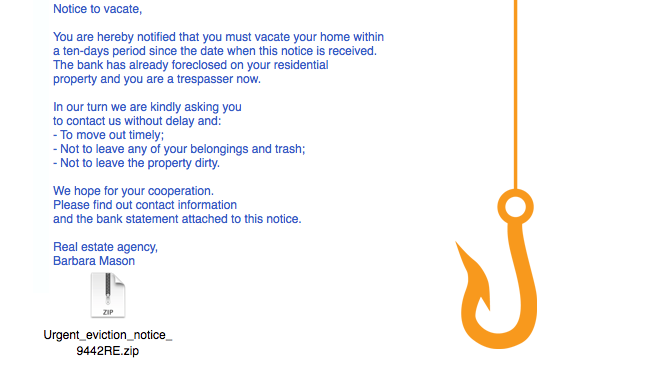 Criminals have countless methods to trick email users.
 - « Previous Page
- 1
- …
- 312
- 313
- 314
- 315
- 316
- …
- 562
- Next Page »